|
|
|
|
|
|
| |
|
Review
This is official description applies to version 2.3
Ultra Screen Saver Maker merges your images, sounds, movies, Flash animations and text messages into a true screensaver! Just collect media files, preview them and simply add to your screen saver project using a point-and-click interface. You can also add text, date and time using different fonts and effects.
The following review written by one of the Software Informer contributors applies to version 2.2
With Ultra Screen Saver Maker we can make our Screensavers in few steps. This program is very easy to handle and has a nice interface.
When we open it we can see a Menu Bar and a panel to our left to handle the different steps for creating our screensaver. In the Menu Bar we can start a new project, open one, save, test the screensaver, set it as default and send it via e-mail.
In the "Project" menu we can add files and handle the different steps for creating our projects. We can name our screen saver, add the author name, put a description, set the exit condition of the screen saver (a keyboard button, a mouse move, or the ESC button, or any combination of these).
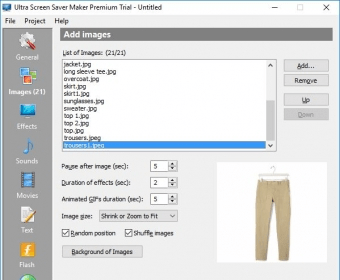
The next step is adding an image - we can set a pause after image (seconds), the duration of effects (seconds), choose the image size, select a random position and shuffle images, and we can select the image or the colors for the background too.
We can add sounds to our screensaver and handle the pause between sounds. Or add movies too if we want. We can add text, insert date or time, add effects, change the properties of the effects (font and color), select the duration of the effects or synchronize them with objects.
The last step is adding Flash Animations - we can change the pause after animations, duration of effects, duration of the last frame, the animation size and select the background color. |
- Can add the name of the Screen saver, add the author name, put the Description, set the exit condition of the screen saver.
- Can Pause after image (seconds), duration of effects (seconds), choose the image size, select a random position and shuffle images and we can select the image or the colors for the background.
|
|
|
Reviewed by: Paula Ledesma Reviewer rating: Reviewed: 3 years ago
|
What's new in version 2.3
- Full Windows 7 support - Windows Media Video (.wmv) support - Significantly improved movie playback - Full multi-monitor support - New screensaver distribution type: Archive containing Screen Saver (.zip) - Improved Flash playback - Showing number of files each multimedia tab contains - Slide effects speed up - Better random position of multimedia elements on the display - Improved overall stability - Displaying short file names in the list and the full path using tooltip - Display command-line switches for screen saver using /help - Disable adding an empty text message - Showing "Display properties" window when setting screen saver as default - "Show mouse cursor" option is enabled for all exit conditions - Triggering system font smoothing fixed - Increasing temporary folder size when playing screen saver fixed - Screensaver crashes if link is attached fixed - Not properly working on Windows Vista fixed - Issues with non-English Windows locale fixed - "Exit condition" crash fixed - Crash when adding certain Flash files fixed - Double sound playback with certain Flash files fixed - Wrong Flash player version detection fixed - Crash when Flash player installation is refused fixed - Cannot play compressed AVI files fixed - AVI files freezing fixed - Crash when testing Flash screensaver and Flash player is not installed fixed - Crash when having "On mouse button" exit condition on registered version fixed - Crash when adding text with hyperlinks on registered version fixed - Animated GIF does not loop fixed - Footer overwritten by Flash animation fixed - Cannot install screen saver with specific files but test works fixed - Screen saver code signing works now |
|
Report a wrong version
Report a wrong program title
Suggest a correction
|
Screenshots
|
|
| .ssp |
PhotoStage Slideshow Project |
|